Meet your team
in your pocket.
AI teammates you give real work to. They answer and call back on your own number with Pocket Link, clear WhatsApp and email, keep the CRM honest, write code on a real machine, and come back when they need your tap.

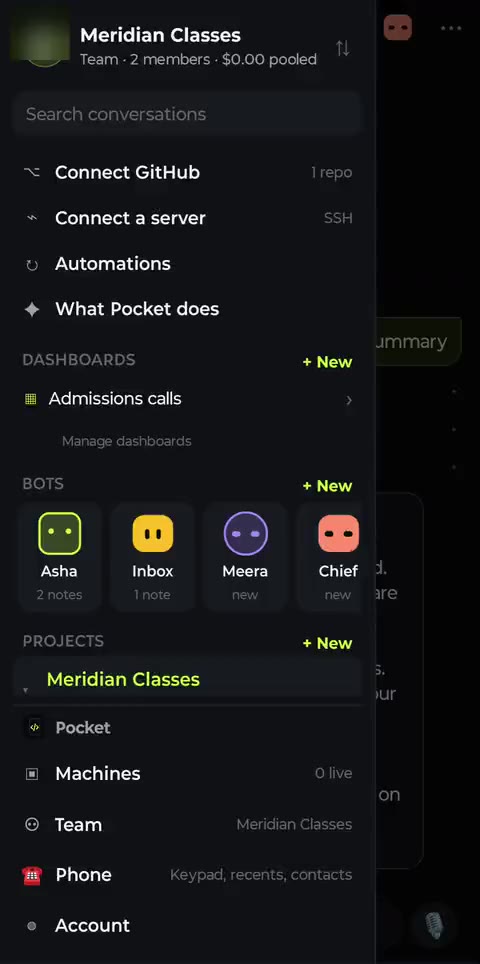
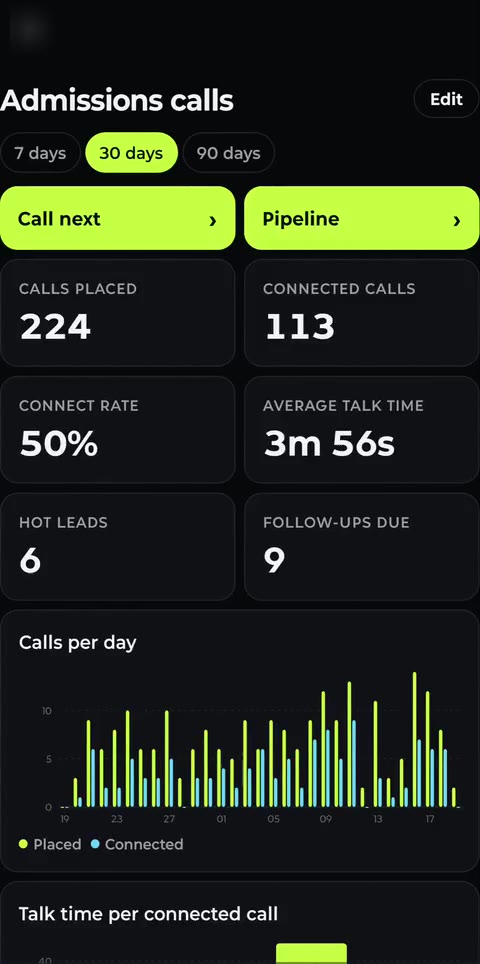
The real app, with a demo team. Nothing here is a mockup.
Pocket Link
Your bot, on your own SIM.
A small adapter that lets the bot hear and speak on your phone's own calls. Your number, your network, your customers' contacts unchanged. The same plug is also the bot's hands on the phone: a touch screen and keyboard the app drives. The first batch is being built now.
- 1
Plug it in
A small pod on the back of the phone, a short lead into the USB-C port. Android sees a headset.
- 2
Pick a bot
Who answers, when, and for whom: everyone, unknown numbers, or only your contacts; office hours; let it ring first.
- 3
Calls on your own number
The bot answers and calls back on your SIM, with the app closed. No Twilio, no root, no new number for your customers.
Android 10 or later. Price is set when the batch ships; the list is not a commitment either way. How it works, in detail →
Calls, the right way
Your number is for your customers.
A business phone that advertises to strangers is a phone you lose: in India TRAI reserves promotional calling for registered telemarketers on 140 numbers. Pocket is built for the other kind of call, the one the person is waiting for.
What the bots will and won't do on a call →Who it calls
People who already deal with you: an enquiry that came in, a booking, an order, an invoice, a ticket. Never a bought list, never a stranger.
When it calls
Inside the calling hours you set, a capped number of retries, and never a number on your do-not-call list.
What it leaves behind
The outcome, the talk time, the transcript and the next step, on the lead, the moment the call ends.
Bots, not chats
Message them like teammates.
Give a bot a name, a job and a brief. It works on its own machine, 24/7, with your phone as its hands, and gets better at your business every week.
They call your customers back
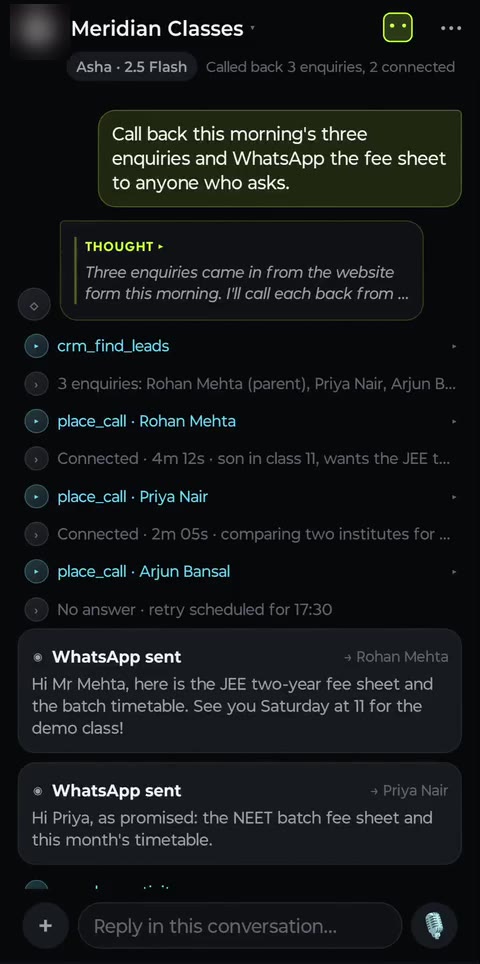
Every enquiry called within minutes, from your own number. The bot answers from your price list, books the next step, and files the outcome and talk time on the lead.

They clear the inbox overnight
WhatsApp and email answered from your own accounts. Anything that needs you waits as a draft for your tap.

They report to one place
A chief-of-staff bot checks in with the others and sends you the day in five lines, with what to approve first.

A CRM and dashboards they keep live
Leads, stages, every call and message on the record, and who to call next. Make as many dashboards as you need and name them anything; bots add tiles and keep the numbers current, and each person sees only what's theirs.
How dashboards work →
Give each bot a job
Hire for the work, not the software.
Start with one. Add another when the work grows: one on callbacks, one on the inbox, one on the code. They run in parallel and report into one place.
Enquiry callbacks
On every new enquiry · retries at 17:30
Calls back everyone who filled your form or messaged your number, within five minutes, from your own number. Answers from your price list, books the next step, and files the call on the lead.
Its brief
“Call every new enquiry within 5 minutes. Answer fees and timings from Knowledge. Book a visit for Saturday. Anything about discounts, hand to me.”
Tools it uses
A day with Pocket
Five bots, one working day.
From the 9 AM callbacks to the 8 PM summary. Every phone screen is a real screen recording of the app, set in paintings of the places these teams work.
Voice agents
Your bots pick up the phone.
Callbacks, confirmations, reminders and support, by voice, in English, Hindi or Hinglish. The bot listens, answers in about two seconds, looks things up mid-call, and files the outcome, talk time and next step on the lead when it hangs up. Speech streams on your own Deepgram, Cartesia or ElevenLabs keys.
Your own number
LivePlug the Pocket Link adapter into an Android phone and the bot makes and takes calls on that SIM, with the app closed.
A Twilio number
LiveConnect Twilio in Account → Voice. Bots ring any number, talk, and log the outcome on the lead.
Voice link
LiveA page anyone can open to talk to your bot. Any phone, no app, no number.
Talk in the app
LiveTap Talk on any bot and speak. It answers aloud and keeps working.

Why Pocket
Built by someone whose computer was a phone.
Yours, not rented
Calls from your number, WhatsApp from your account, agents on your machine or ours. No PBX, no SMS gateway, no middleman per wire.
Bring your own keys
OpenAI, Anthropic, Gemini, OpenRouter, Fireworks, Sarvam, ElevenLabs. Your keys are sealed, used only for your runs, and never marked up.
Priced where phones are the computer
Pro is $8, or ₹399 in India. No per-minute fees on your own number and keys. Regional prices in Brazil, Indonesia, Nigeria and Vietnam too.
Pricing
You pay for the machine. Tokens are close to cost.
Compute is the part we can buy well and run cheaply, so that is what we sell. Model tokens carry a small markup, and you can remove it entirely by bringing your own key.
Free
Bring your own keys. Your first agent, free.
Free forever
- 1 bot on 1 channel: WhatsApp, SMS, email or calls; 1 call at a time on Pocket's engine
- About 50 cloud runs a month; unlimited on your own machine
- Bring your own model, voice and Twilio keys
- $0.25 of model credits to try it without a key
Pro
Every channel, always on, for less than a coffee a week.
Billed monthly, cancel anytime
- WhatsApp, SMS, email and calls, always on
- Up to 50 bots, headless on your phone
- Call from your own Twilio number; 2 calls at once on Pocket's engine, as many as your own machine carries
- 10 hours of cloud agent time (fair use); unlimited on your own machine
- $2 of model credits if you don't bring a key
Plan allotments reset each billing period and do not roll over. Separately purchased top-up credits never expire — we do not run an expiring-credit business.
Questions
Reasonable doubts.
Can the bot talk on my phone's own calls?
Yes, three ways. The Pocket Link adapter plugs into an Android phone and lets the bot hear and speak on that SIM's calls, inbound and outbound, with the app closed. A Twilio number works with no hardware. And a rooted phone can do it on its own. Voice links and Talk in the app need no number at all.
Can I use it for marketing calls or a cold-calling campaign?
No. In India promotional calls may only be made by registered telemarketers from 140-series numbers, and an ordinary number used that way gets disconnected; similar rules apply under the TCPA and PECR elsewhere. Pocket calls the people who already deal with you: enquiries, bookings, orders, payments, support. Our terms say the same, and the dialer is built around calling hours, a do-not-call list and capped retries.
What does it need from my phone?
Install the Pocket app and sign in. For calls, SMS and your WhatsApp app, turn on Phone control; each capability is a separate switch, and anything risky waits for your tap. Everything else runs on a machine in the cloud, so your battery and data are left alone.
What is the difference between a chat and a bot?
A chat is one task. A bot is persistent: a name, a brief, memory across conversations, its own model, and routines that wake it on a schedule, a webhook or a new message.
What happens when I close the app or lose signal?
Work keeps going on the machine. A line in your notification shade tracks it, and you get a push when a task finishes or needs a decision.
Can I use my own model keys and my own server?
Yes, on every plan including free. Keys are encrypted at rest and tokens billed to them don't touch your credits. Attach any Linux box over SSH, or a machine at home over an encrypted relay.
Do you train on my data?
No. Machines are single-tenant, your data stays on your machine, and with your own key the model provider never sees us in the middle.
Put your first agent to work today.
Install the app, hire your first bot, and give it something real to do. Thirty minutes of agent time free, no card.